Telegram
PwrAgent’s Telegram adapter uses long polling — PwrAgent dials out to Telegram, no public callback URL or webhook tunnel is needed.
What you need to get started
A bot token from BotFather. That’s it. You do not need:
- Your Telegram user ID (numeric)
- Your bot’s user ID (numeric)
- Any supergroup ID (negative number)
PwrAgent discovers the bot’s ID from the token at startup, and a self-service pairing flow handles your user ID. The bot token is the single piece of information you have to bring.
Step by step
- Create the bot. Open Telegram, message
@BotFather, send
/newbot, and follow the prompts. BotFather replies with a bot token (looks like123456789:ABCdefGhIjKlMnOpQrStUvWxYz). Copy it. - Open Settings → Messaging → Telegram in PwrAgent.
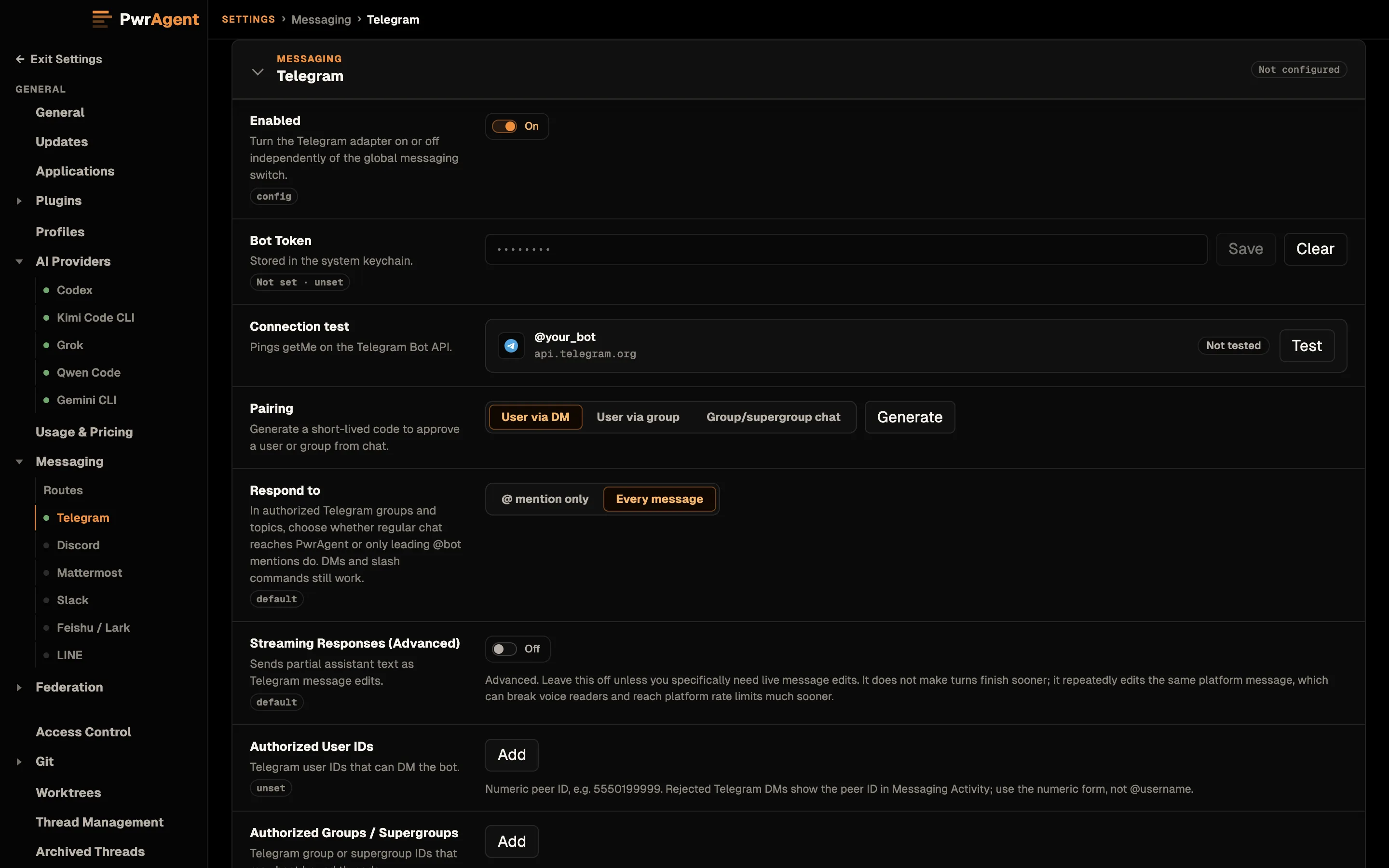
- Paste the bot token into the Bot Token field. It saves when you click or tab out of the field, or press Enter.
- Click Test. PwrAgent calls
getMeagainst the Telegram Bot API. On success, the row reports the bot’s username and bot ID — that confirms the token is valid and PwrAgent can reach Telegram. - Enable Telegram with the toggle at the top of the panel.
- Generate a pairing token. In Settings → Messaging → Telegram, click Generate pairing token. PwrAgent shows a short one-time code.
- Send the pairing code to your bot. Open the bot’s DM in Telegram and send the code as a regular message.
- Approve the pairing. A pairing confirmation appears in PwrAgent’s Settings panel. Approve it. Your Telegram user ID is now on the authorized-user allowlist; the desktop has discovered who you are without you needing to find your numeric ID anywhere.
- Try
/resume. Send/resume(or@<botusername> resume) from that DM. The bot replies with the thread picker.
If the pairing-DM step doesn’t work, you can fall back to the discovery path: leave the authorized-user list empty, send any message to the bot, and open Settings → Messaging → Activity. PwrAgent discards the unauthorized message and logs your Telegram user ID there. Copy the ID into the authorized list. The pairing flow is just the friendlier version of that same path.
For the captured walkthrough of the pairing flow (generate → send code → approve), and for the troubleshooting Activity screen that shows blocked inbound messages, see Messaging → Pairing. Same flow on every supported platform; the screenshots there happen to be Telegram.
Settings reference
Required (above the Test button)
| Setting | What it does |
|---|---|
| Enabled | Top-of-panel toggle. When off, the adapter doesn’t start. |
| Bot Token | The BotFather token. Stored in the system keychain. The Test button calls getMe to verify. |
| Authorized User IDs | Comma-separated list of stable Telegram numeric user IDs. The pairing flow populates this; you can also paste IDs in directly. Empty = discovery mode (every inbound is rejected and logged). |
Optional (below the Test button)
| Setting | Default | What it does | When to change |
|---|---|---|---|
| Streaming Responses (Advanced) | Off | When on, the bot edits its reply message in place as the agent’s response arrives. | Leave off. Edits eat Telegram’s tight rate-limit budget and break voice readers. See Streaming responses. |
| Working Updates | Show Some | How much of the agent’s in-progress work (tool activity + narration) is bridged to the conversation. | Show More if you want more visibility, Show Less or Show None to quiet the channel. The status card’s Working Updates button overrides per-binding. See Working Updates. |
| Image Upload Profile | medium | Quality / size used when forwarding inbound images to the model. | low if uploads are slow, high / actual if you’re sharing screenshots with text the model needs to read. |
| Input Debounce (ms) | 500 | How long PwrAgent waits after a message before starting a turn, so multi-part messages stay in one turn. | Increase if you tend to send multi-part messages over a few seconds; 0 disables the wait entirely. |
Telegram-specific notes
- Supergroup write budgets are shared across topics. If you bind multiple active PwrAgent threads to different topics in the same supergroup, they share the supergroup’s ~20 msg/min budget. Use one supergroup per active thread for serious work; topics are fine for read-mostly bindings.
- Forum topic ownership needs admin rights. To let PwrAgent create,
rename, close, or reopen topics, make the bot an admin with topic
management rights. To let PwrAgent delete a topic, also grant delete
message rights. Telegram deletion removes the topic and its messages,
so PwrAgent treats cleanup as a dry run until you approve a specific
action. Start with
/monitor, then use the monitor card’s Topics button to create or reuse the PwrAgent control topic. - Telegram bots cannot list every historical topic. PwrAgent can manage topics it creates, topics it observes through normal traffic or forum-topic service messages, and topics you adopt from inside the topic. A first cleanup sweep may therefore say it only knows about adopted/observed topics.
- DM budget is roughly 60 msg/min. Plenty for normal use, but streaming-on responses can burn through this in a single long turn.
- PwrAgent clears any configured Telegram webhook on startup. If you previously experimented with webhook mode on this bot, the long polling adapter takes precedence and silently clears the webhook setting.
- Mention parsing requires
getMeto succeed at startup. IfgetMefails (network blip, expired token),@<botusername> resumewon’t work until the next restart, though slash commands still do. - Telegram does not support edits on the General topic of a forum supergroup; PwrAgent automatically falls back to posting a new message when an edit isn’t allowed.
Why you do not need to use a webhook
Telegram supports both long polling (the bot dials out) and webhook mode (Telegram dials in to a public URL you host). PwrAgent uses long polling. The author worked on Telegram webhook delivery in OpenClaw and confirmed it does not improve message delivery time vs. long polling. The webhook path adds public-internet attack surface for no measurable benefit. See Webhooks — a security note.
See also
- Driving an agent from a messenger — bindings, commands, status card, tool updates, slow mode.
- Streaming responses
- Webhooks — a security note