Feishu / Lark
Feishu (the China-region brand) and Lark (international) share the
same Open Platform protocol. PwrAgent uses feishu as the internal
code identifier and exposes the region as a setting.
The default and recommended transport is the persistent SDK WebSocket — PwrAgent dials out, and operators don’t need to expose a localhost listener. Webhook mode exists as a fallback; see Webhooks — a security note before enabling it.
What you need to get started
- A custom app in the Feishu / Lark Open Platform console with the Bot capability enabled.
- The app’s App ID and App Secret.
- The right region selected — Feishu (
open.feishu.cn) or Lark (open.larksuite.com).
The persistent-connection path does not require an Encryption Key or Verification Token. Encryption is recommended; if you enable it in the console, also store the Encryption Key in PwrAgent so events can be decrypted before dispatch.
Step by step
- Create the custom app. In the Feishu / Lark Open Platform console, create a custom app. Enable the Bot capability.
- Copy the App ID and App Secret.
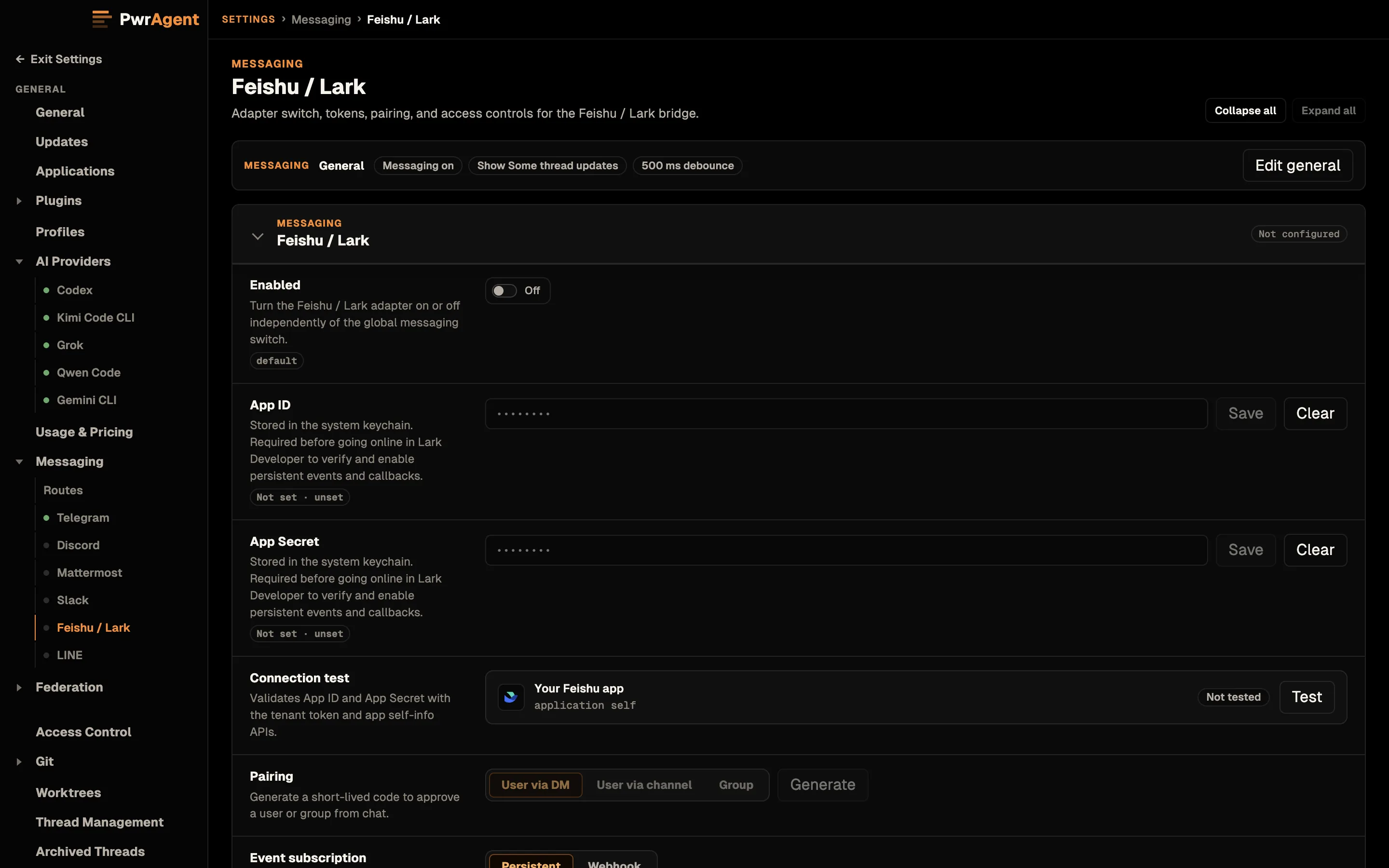
- Open Settings → Messaging → Feishu / Lark in PwrAgent.
- Pick the tenant region — Feishu or Lark.
- Paste the App ID and App Secret. Each saves when you click or tab out of its field, or press Enter.
- Click Test. PwrAgent mints a tenant access token and calls
/open-apis/bot/v3/infoto confirm the credentials. - Enable Feishu / Lark with the toggle at the top of the panel.
- Configure events in the Open Platform console.
- Go to Event Configuration and pick Receive events through persistent connection (this is PwrAgent’s default).
- Subscribe to
im.message.receive_v1(required for DMs and group mentions). - Optionally subscribe to
im.chat.access_event.bot_p2p_chat_entered_v1to avoid noisy “no handler” SDK logs.
- Configure card callbacks in the same way.
- Go to Callback Configuration and pick Receive callbacks through persistent connection.
- Add
card.action.triggerso the bot receives clicks on interactive card buttons (Resume, status card actions, etc.).
- Grant permissions. In the console, grant the messaging scopes described in “Permission scopes” below. Then publish a version of the internal app — Feishu / Lark does not apply event subscriptions or scope changes until a new app version is published.
- Add allowlisted user IDs. Feishu
open_idvalues look likeou_…. For shared chats, also add chat IDs (oc_…) or tenant keys to the corresponding allowlists. - Try
@PwrAgent resumein a DM or, in a group chat, type@, pick the bot from the suggestion list, thenresume.
Permission scopes
Required for the current adapter shape:
im:message.group_at_msg:readonly— receive user mentions in group chats.im:message.group_at_msg.include_bot:readonlyis broader and needed only if you want events for mentions sent by other bots.im:message:send_as_bot— send messages and post status cards as the bot.
Recommended:
im:message:readonly— read direct and group messages; also needed for image / file resource downloads.im:message:update— refresh or dismiss status cards instead of posting duplicates.im:chat:readonly— group membership and chat metadata for shared-chat bindings.
Broad shortcut: im:message covers multiple message read/send
capabilities. Fine for a private internal app; narrower scopes above
are easier to get approved.
Pairing
For the captured walkthrough of the pairing flow (generate → send code → approve), and the troubleshooting Activity screen that shows blocked inbound messages, see Messaging → Pairing. Same flow on every supported platform; the screenshots there happen to be Telegram.
Settings reference
Required (above the Test button)
| Setting | What it does |
|---|---|
| Enabled | Top-of-panel toggle. When off, the adapter doesn’t start. |
| Tenant Region | feishu or lark. Determines which API host PwrAgent uses. |
| App ID | From the Open Platform console. |
| App Secret | From the Open Platform console. Stored in the system keychain. |
| Authorized User IDs | Comma-separated Feishu open_id values (ou_…). |
Optional (below the Test button)
| Setting | Default | What it does | When to change |
|---|---|---|---|
| Inbound Mode | persistent | Use the persistent WebSocket or a public webhook. | Leave on persistent. Switching to webhook requires running a tunneled HTTP listener — see Webhooks — a security note. |
| Tenant URL | (region default) | Override the API host. | Only for self-hosted Lark deployments or special tenants. |
| Callback Base URL | (blank) | Public URL for webhook mode. | Only required if you set Inbound Mode to webhook. |
| Verification Token | (blank) | Webhook event verification token. | Only required in webhook mode. |
| Encryption Key | (blank) | Encrypts event envelopes from the platform. Recommended in either mode. | Set to the value from the console’s Event Subscriptions → Encryption Key field. Stored in the system keychain. |
| Authorized Chats | (empty) | Allowlist of group chat IDs (oc_…) the bot will respond in. |
Required for any group chat the bot should accept events from. |
| Authorized Tenants | (empty) | Allowlist of tenant keys for shared workspaces. | Use for multi-tenant deployments where you want the bot to scope to specific tenants. |
| Slash Command Prefix | pwragent_ | Prefix prepended to registered slash commands. | Set to empty to register bare triggers; accept the collision risk. |
| Register Slash Commands | Off | Reconcile native slash commands on startup. | Turn on if you want /pwragent_resume etc. in the console-registered slash menu. |
| Streaming Responses (Advanced) | Off | Bot edits its reply message in place as text streams in. | Leave off. See Streaming responses. |
| Working Updates | Show Some | How much of the agent’s in-progress work (tool activity + narration) is bridged to the conversation. | See Working Updates; per-binding override on the status card. |
| Image Upload Profile | medium | Quality used when forwarding inbound images to the model. | Tune per bandwidth / fidelity tradeoff. |
Feishu-specific notes
- In group chats, PwrAgent’s supported path is mention-triggered —
type
@, pick the bot, then send the message. DMs work without a mention. Tenants that grant broader group-message read permissions do not change the recommended adapter path. - Interactive card buttons carry only signed opaque callback handles. The actual action ID, binding ID, and routing state live in PwrAgent’s callback handle store, so buttons survive app restarts and fail closed after expiry.
- Audio and video messages are unsupported today and arrive as rejected attachments.
See also
- Driving an agent from a messenger
- Streaming responses
- Webhooks — a security note — only relevant if you switch off persistent mode.